How to add your GitHub activities to your GitHub Profile

Hey 👋🏻,
I am a Software Engineer from Austria 🇦🇹. I am interested in, write about, and develop (open source) software solutions for and with JavaScript, TypeScript, ReactJs, and NodeJS.
You can see what I am currently up to on natterstefan.me.
In the past, I was Product Owner of RAWR, Growth Hacker at the Speedinvest Startup Studio and Online Advertising Manager. Check out my LinkedIn profile for more details.
📬 Get in touch- Twitter: twitter.com/natterstefan
- Blog: dev.to/natterstefan
- Web: natterstefan.me
- LinkedIn: linkedin.com/in/natterstefan
📧 Sign up for my newsletter.
Yesterday I showed you how to share your blog posts or YouTube videos on your GitHub profile. Today I have another tip for you on how to take your GitHub profile to the next level.
Especially if you contribute to open source projects or have published your own, you will always be active on GitHub. You write comments or merge pull requests. Just like blog posts, you can add these activities to your GitHub profile. This gives recruiters and other visitors to your GitHub profile a quick picture of what you've done recently. In this case, we also use GitHub Actions to get there.
GitHub Action Setup
This time we are using an action from James George: github-activity-readme. He contacted me on Twitter months ago and asked if I could test his GitHub Action. I gladly did.
If you haven't set up your GitHub profile yet, here's a quick reminder:
- create a GitHub repository with your username: https://github.com/natterstefan/natterstefan
- add a README.md
- the contents of README.md will be displayed on your profile (e.g. github.com/natterstefan) as soon as you commit and push changes.
Now paste the following content into a new GitHub action file under the following path .github/workflows/update-readme.yml.
name: Update README

on:
  schedule:
    # Runs every 30 minutes
    - cron: '*/30 * * * *'

jobs:
  build:
    runs-on: ubuntu-latest
    name: Update this repo's README with recent activity

    steps:
      - uses: actions/checkout@v2
      - uses: jamesgeorge007/github-activity-readme@master
        env:
          GITHUB_TOKEN: ${{ secrets.GITHUB_TOKEN }}
And finally, add the following into your README.md wherever you want to place the GitHub activity feed:
### Recent Activity

<!--START_SECTION:activity-->
<!--END_SECTION:activity-->
Once the GitHub Action was triggered according to your schedule you will see a new section in your GitHub profile similar to mine:
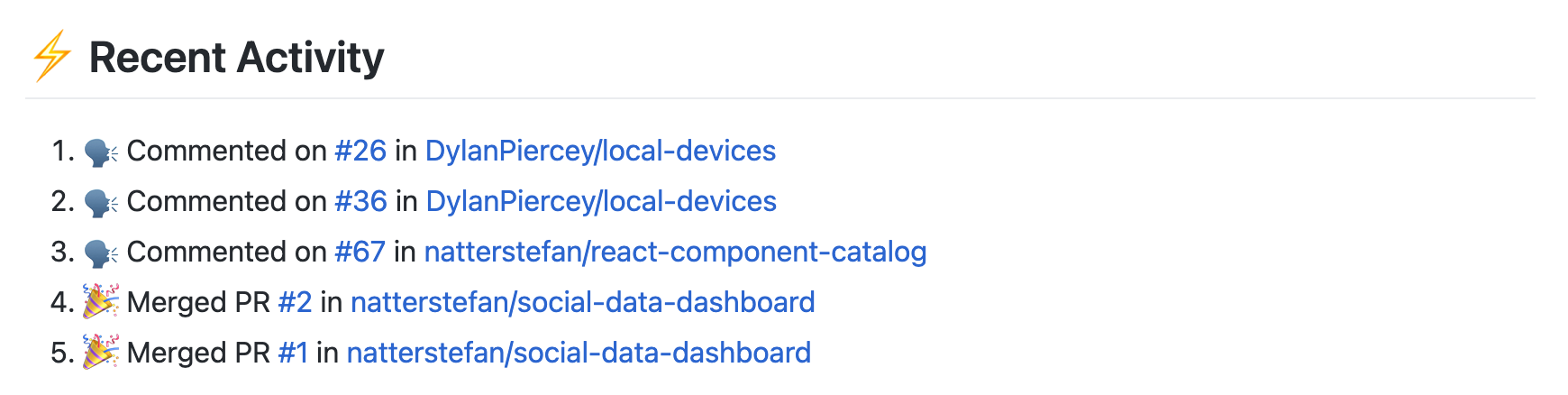
There are some more options for this GitHub action, which are documented in the repository.
That's it. Now you have your GitHub activities on your profile! Congrats!
Questions and Feedback
You got any questions or want to add your thoughts? Let me know in the comments below, please.