Delete Unused node_modules From Your Computer Like a Pro With "npkill"
Get storage back - in seconds.

Hey 👋🏻,
I am a Software Engineer from Austria 🇦🇹. I am interested in, write about, and develop (open source) software solutions for and with JavaScript, TypeScript, ReactJs, and NodeJS.
You can see what I am currently up to on natterstefan.me.
In the past, I was Product Owner of RAWR, Growth Hacker at the Speedinvest Startup Studio and Online Advertising Manager. Check out my LinkedIn profile for more details.
📬 Get in touch- Twitter: twitter.com/natterstefan
- Blog: dev.to/natterstefan
- Web: natterstefan.me
- LinkedIn: linkedin.com/in/natterstefan
📧 Sign up for my newsletter.
When you execute yarn install or npm install, plenty of node_modules are installed. Your dependencies and devDependencies and their dependencies and so on. So it can quickly happen that the node_modules folder of your project becomes several hundred megabytes large. This doesn't sound too bad at first sight, after all, most of us probably have SSDs with >= 500 GB in our laptops and several hard disks in our desktop computers. And yet, excess unused blocked storage space is not an ideal situation. For this reason, I regularly go over my local repositories with npkill and remove all node_modules that are no longer used. I will show you how to do this.
The solution - npkill
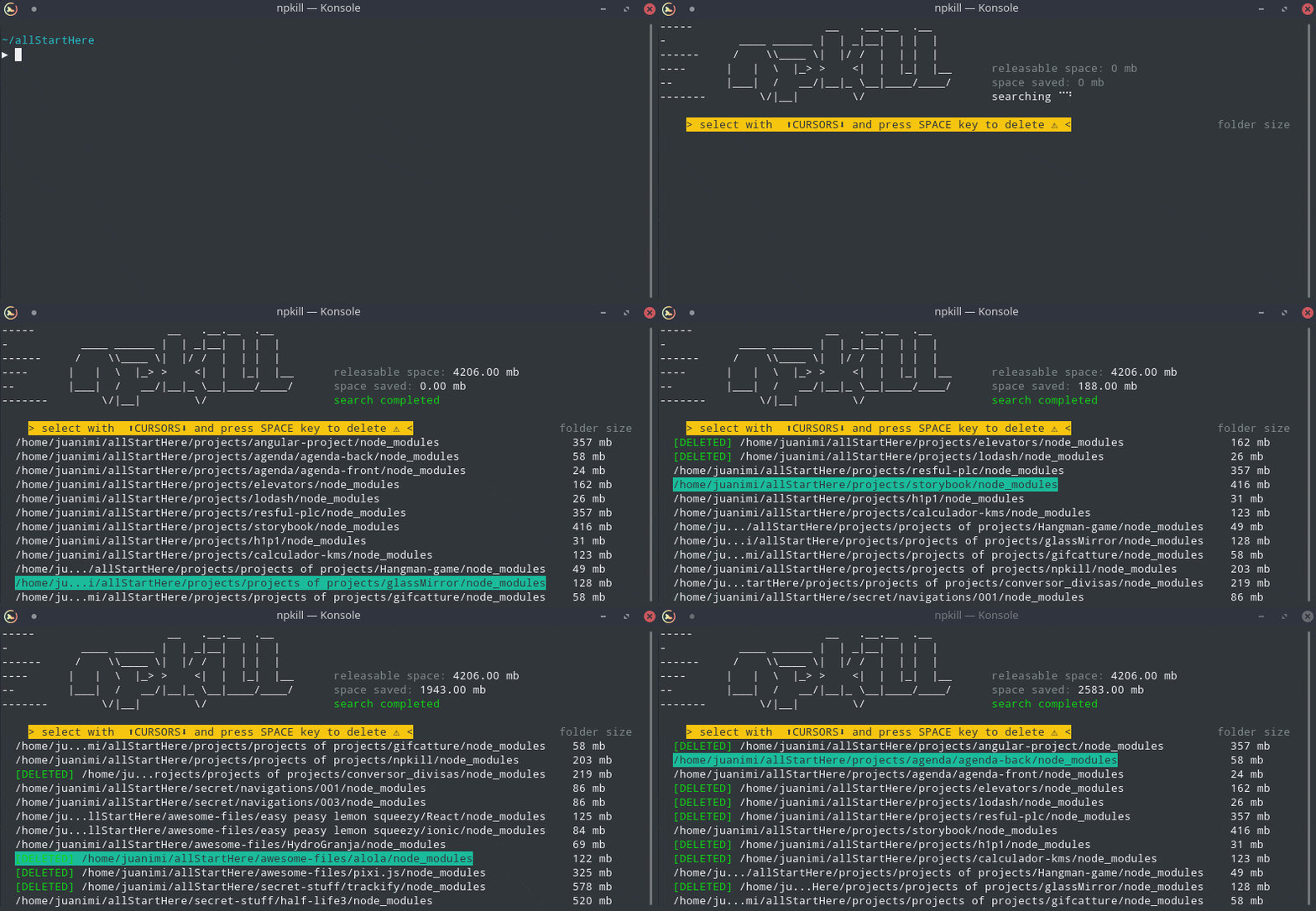
Easily find and remove old and heavy node_modules folders ✨
That is exactly what npkill is all about and what it is. It looks for all node_modules (sub-)folders starting at the path where npkill was executed, suggests them for deletion, and removes selected ones when you confirm the selection. This way you can very quickly remove unnecessary clutter. Think of it like docker system prune only for node_modules.
How to use npkill
You do not need to install npkill as you can simply start it with:
npx npkill
You will see a list of node_modules after it finished the scan. Move up and down with ↓ ↑ and hit Space to delete the selected folder. To exit, hit Q or Ctrl + c. Now you can watch npkill doing its job.
There are more options available, which are listed on the npm page of npkill.
Two more things 🥳
Whilst doing my research for this article, I stumbled upon some other interesting commands I want to share with you.
How to count installed packages
Do you know how many packages you have installed for your app? I didn't and was surprised about the result when I used this command.
# https://stackoverflow.com/a/57109195/1238150
npm ls | sed '/deduped$/d' | wc -l
If you want to know more about this complex command, take a look at the explanation on explainshell.com.
How to find unused packages in your package.json
I found this tool called Depcheck that is a tool for
(...) analyzing the dependencies in a project to see: how each dependency is used, which dependencies are useless, and which dependencies are missing from package.json.
Similar to npkill you can run it without installing:
npx depcheck
Share 💛
Do you like this article? Do you want to support me? Tell your friends on Twitter about it. Thank you!
Questions and Feedback
You got any questions or want to add your thoughts? Let me know in the comments below, please.